UX Testing Tool: How to Choose the Right One in 2026
A UX testing tool should help you catch usability issues before launch. Here is how to compare manual, behavior, and AI-first options in 2026.
Websonic Team
Websonic
A UX testing tool should help you answer one expensive question before your users do: where is the friction that will slow people down, confuse them, or make them leave? In 2026, that question matters more because websites change constantly, research teams are smaller, and product teams are shipping faster than traditional usability workflows can keep up.
Quick answer: if your team ships every week and cannot run formal usability studies for every release, start with an automated UX testing tool for recurring pre-launch coverage, then add replay tools for live-user diagnosis and human studies for high-stakes flows.
Use this page fast: 2-minute chooser · tool categories · buying guide by team type · FAQ
| If your team mostly needs to... | Start with this UX testing tool category | Why this is the right first layer |
|---|---|---|
| Catch obvious issues before launch every week | Automated website testing tools | Best recurring coverage when release speed is the problem |
| Investigate why live users are dropping | Behavior and replay tools | Best when you already have traffic and need real-user evidence |
| Understand trust, confusion, and messaging risk | Research and study tools | Best when the real question is why users hesitate |
| Cover all three without hiring a full research team | Hybrid stack | Use automation for coverage, replay for diagnosis, and humans for interpretation |
Choose the category that matches the question you need answered first. Most teams buy the wrong UX testing tool when they start from vendor demos instead of the job to be done.
The market has split into three categories. Some UX testing tools help you observe behavior after launch. Some help you run structured studies with participants. And a newer category uses automation and AI to audit pages and flows before or between releases. The right choice depends less on feature checklists than on what kind of problems you need to catch, how quickly you need answers, and whether you need depth, coverage, or both.
For most teams, the short answer is this: no single UX testing tool is enough on its own. The best setups combine human research with a faster layer of automated website testing so obvious problems stop reaching production. If you are already choosing between named vendors instead of categories, use our roundup of the best UX testing tools in 2026 to compare where replay, research, and AI audit products fit.
If you only have 2 minutes
Most lean teams should add automated website testing first, then layer in replay or human studies where the stakes are highest.
| Tool type | Best when | Main weakness | Time to answer |
|---|---|---|---|
| Automated website testing tools | You need recurring pre-launch coverage across pages and flows | Less emotional/context depth than live studies | Minutes |
| Behavior and replay tools | You need to debug real-user friction on live pages | Reactive; needs traffic first | After launch |
| Research and study tools | You need to understand why users hesitate or misread a flow | Slower; requires participants and analysis | Days to weeks |
If you are weighing categories rather than brands, start here: choose replay tools when you need production evidence, study tools when you need human explanation, and automated website testing tools when you need repeatable pre-launch coverage. If you want the fuller breakdown first, read our guides to website usability testing: manual vs AI, AI website analyzer: what it finds that your team misses, and this side-by-side roundup of the best UX testing tools in 2026.
What a UX testing tool is supposed to do
A lot of teams buy a UX testing tool and then use it like a fancier analytics dashboard. That misses the point.
A real UX testing tool should help you identify whether a first-time visitor can complete an important task without confusion, hesitation, or unnecessary work. That can mean different things depending on the tool:
- session replay tools show where users struggle after launch
- unmoderated research tools help you validate flows and collect feedback
- automated website testing tools scan for recurring UX problems before launch
- accessibility and heuristic tools catch structural issues that make tasks harder than they should be
The best tool is not the one with the longest list of integrations. It is the one that helps your team catch the most costly usability problems at the right moment.
Why choosing the wrong UX testing tool gets expensive fast
The business cost of weak UX is rarely dramatic in the moment. It usually looks like a small drop in conversion, slightly worse checkout completion, more support tickets, or a landing page that “should be working better” but never quite does.
That slow leak adds up. Baymard’s 2025 checkout research found that 64% of leading desktop ecommerce sites and 63% of mobile sites still have a mediocre or worse checkout UX. Even more revealing, 19% of users abandoned an order because they did not want to create an account, while 62% of sites still fail to make guest checkout the most prominent option. These are not obscure edge cases. They are common UX failures on major sites with real budgets and real teams.
Baymard’s 2025 checkout benchmark shows the most expensive UX mistakes are still ordinary, not exotic.
The problem is not that companies do not care about UX. The problem is timing. Many teams rely on periodic manual research, then spend the time between studies shipping new landing pages, changing navigation, tweaking onboarding, and patching mobile layouts. By the time the next study happens, the site has already accumulated another layer of friction.
The real risk is not missing user insights. It is shipping new friction faster than your research cycle can catch it.
That is why the choice of UX testing tool matters. A tool that only helps after launch leaves you blind before launch. A tool that only supports structured studies leaves you under-covered between studies. A tool that only scans pages without human interpretation can show symptoms without context.
The three main UX testing tool categories in 2026
If you are evaluating the category today, it helps to think in systems, not brands.
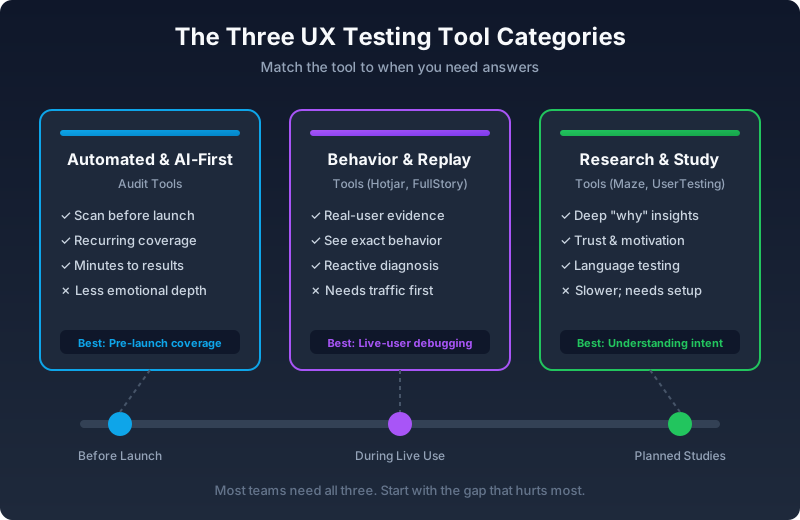
The three categories map to different phases of the product lifecycle. Most teams eventually need all three, but the order depends on your biggest gap.
1. Behavior and replay tools
These tools show what real users did after they reached the site. Hotjar and FullStory are common examples. They are useful when you want to see click patterns, rage clicks, dead clicks, scroll depth, or the exact sequence of actions before a user drops.
Their strength is realism. You are not guessing what people did. You are looking at actual behavior.
Their weakness is timing. They need traffic before they become useful. They are also mostly reactive. You learn after the problem has already been experienced by real users.
This kind of UX testing tool is best when you need to answer questions like:
- where are users abandoning a live flow?
- what happened right before a support complaint?
- which page sections are being ignored?
- what changed after a redesign?
2. Research and study tools
These tools help you run tests with participants, often before launch. Maze is a common example, especially for prototypes and unmoderated design validation. Traditional moderated testing also belongs here even when it is not mediated by a single platform.
Their strength is depth. They help you understand why someone hesitated, what they expected, how they interpreted your language, and what made a page feel risky or unclear.
Their weakness is throughput. You need a plan, a task design, participants, and time to analyze what happened. Nielsen Norman Group’s well-known guidance still applies here: small tests with 5 users often reveal most major usability problems in a round, and repeated small studies usually outperform one giant study. But even five-user studies do not happen as often as teams think they do.
This kind of UX testing tool is best when you need to answer questions like:
- does the value proposition make sense?
- do users trust the offer?
- which design direction is clearer?
- why are users misreading this flow?
3. Automated and AI-first audit tools
This is the fastest-growing part of the category. An automated UX testing tool does not wait for traffic or participants. It scans the site or flow directly and looks for patterns that tend to create friction: weak call-to-action hierarchy, crowded layouts, form overload, mobile usability issues, unclear next steps, missing trust signals, and other recurring problems.
This is where tools like Websonic fit. The strength of this category is coverage. You can run the same audit before launch, after a release, or on a recurring schedule across important pages and flows.
Why automated website testing is the first layer lean teams should add
If your team ships landing pages, pricing changes, onboarding tweaks, and template updates every week, the first missing layer is usually not another dashboard. It is repeatable pre-launch coverage.
That is the real wedge for automated website testing. Replay tools tell you what happened after visitors were already exposed to the problem. Study tools help you understand why people hesitate, but they are slower and harder to run continuously. Automated website testing sits in the middle: fast enough to run every release, concrete enough to produce screenshot-backed evidence, and broad enough to catch recurring issues before a live user does.
For lean teams, that usually makes automated website testing the best first addition. It gives you a baseline you can run on homepage changes, signup flows, checkout paths, and campaign pages without waiting for traffic or recruiting participants.
The weakness is that automation cannot fully explain human emotion. It can show likely friction. It cannot fully replace the insight you get from hearing a user say, “I thought this was only for enterprise teams,” or “I did not trust this page enough to keep going.”
This kind of UX testing tool is best when you need to answer questions like:
- what obvious usability issues are shipping right now?
- where is the mobile experience likely weaker than desktop?
- which templates are creating repeatable friction?
- what should we fix before this release goes live?
How to compare a UX testing tool without getting lost in vendor demos
Most UX testing tool demos make the same mistake: they show what the interface can do, not what kind of team it actually helps.
A better way to compare tools is to score them against the work you really need done.
Coverage
Can the tool evaluate a handful of pages, or your entire funnel? Can it inspect mobile and desktop? Does it work only after launch, or before launch too?
If your site changes often, coverage matters more than another chart in a dashboard. This is also where automated website testing becomes more valuable than teams expect: the same audit can be rerun across homepage, signup, pricing, and onboarding changes without rebuilding an entire research plan. And if your release risk includes procurement requirements, ADA exposure, or small-team QA gaps, pair that layer with our website accessibility testing guide for small teams so keyboard and screen-reader failures do not get treated as an afterthought.
Depth
Can the tool explain why users are confused, or only where they dropped? Session replay and live studies usually do better here than automated scanning.
Speed
How long does it take to go from question to answer? If the answer is “after we recruit participants next month,” you do not have a weekly UX workflow. You have an occasional project.
Actionability
Does the output help product, design, and engineering decide what to do next? A good UX testing tool should make the next step obvious, not create another report that nobody owns. That is the strongest case for screenshot-backed audits and AI website analyzer workflows: evidence is easier to assign than a vague note that the page “felt confusing.”
Maintenance cost
Some tools are easy to buy but hard to maintain. If tagging, event setup, panel recruitment, or test scripting becomes a recurring burden, the team will use the tool less than planned.
UX testing tool comparison: which category fits which job?
| If your biggest question is... | Best-fit UX testing tool | Why it fits | What to pair it with later |
|---|---|---|---|
| "What is breaking on live pages right now?" | Behavior and replay tools | You need real-user evidence, not a simulated pass | Automated audits before release |
| "Why are users hesitating or misunderstanding the flow?" | Research and study tools | You need language, trust, and motivation context | Replay data on the live funnel |
| "What obvious usability issues are we shipping every week?" | Automated and AI-first audit tools | You need fast coverage across pages before traffic finds the issues | Human research on high-stakes flows |
| "We only have budget for one new layer this quarter" | Usually automated website testing | It gives lean teams the fastest path to recurring coverage | Lightweight user interviews once patterns appear |
That is the simplest way to compare a UX testing tool in practice: match the tool to the question, then fill the next-most-expensive gap second. If the debate inside your team has shifted from tool category to execution model, our guide to agentic testing vs. AI-assisted testing breaks down where runtime autonomy helps and where deterministic tests are still the better default.
What to buy first based on your actual operating constraint
| If your real constraint is... | Buy this first | Why this UX testing tool layer comes first | Add next |
|---|---|---|---|
| You ship landing pages or onboarding changes every week | Automated website testing | Weekly release speed creates more uncovered surface area than most lean teams can manually review | Replay on live funnel bottlenecks |
| You already have traffic, but nobody can explain drop-off | Behavior and replay tools | The missing input is real-user evidence, not another hypothetical audit | Human interviews on the highest-friction step |
| Stakeholders disagree on messaging, trust, or comprehension | Research and study tools | The real risk is interpretation, so you need users talking through the decision | Automation for recurring regression checks |
| Your team is tiny and can only add one habit this quarter | Automated website testing | It creates a repeatable pre-launch baseline without recruiting, scripting, or waiting for volume | Lightweight feedback and replay later |
| You have a mature research practice but messy implementation drift | Automated website testing plus scheduled spot checks | The main failure mode is not insight scarcity; it is production drift between studies | Replay for pages where live behavior still surprises you |
Most teams should buy for the bottleneck they already feel every week, not the flashiest demo they saw in a category page. The wrong UX testing tool usually fails because it answers a different question than the one slowing the team down.
A practical buying guide by team type
If you are a small startup or lean product team
You likely do not have a full-time researcher, and you probably cannot run live studies for every release.
Your best move is usually a hybrid stack:
- one lightweight research pass for messaging and trust
- one automated website testing layer for recurring audits
- one behavior tool later, once traffic is high enough to justify it
This is where an AI-first UX testing tool earns its keep. It gives you coverage when you do not have the time or staffing for constant manual review.
If you are a growth-stage company
At this stage, your problem is not whether you have user data. It is whether you can keep up with it. You probably already have analytics, support tickets, recordings, and multiple teams making changes.
A strong setup here is:
- replay or behavior tooling for live-user evidence
- manual testing on important flows
- automated auditing before and after releases
This lets you work both directions: proactively catch issues before launch, then investigate the pages where real users still struggle.
If you are research-heavy or design-led
If you already run regular studies, the main gap is often not depth. It is drift. A polished prototype can become a messy live experience after implementation details, marketing edits, and sprint pressure start piling up.
In that case, use a research-focused UX testing tool for hypothesis work and an automated one for production coverage. That combination protects the quality of the shipped experience, not just the planned one.
When a UX testing tool is not enough by itself
There is a limit to what any tool can do.
A replay tool cannot tell you how users interpreted your positioning before they bounced. A live study cannot cover every new page your marketing team publishes. An automated UX testing tool cannot fully understand trust, motivation, or customer context.
That is why the strongest teams no longer ask, “What is the best UX testing tool?”
They ask:
- what should we audit continuously?
- what should we validate with humans?
- what should we investigate after launch?
That framing leads to better decisions because it matches tools to jobs.
So which UX testing tool should you choose?
If you only want a short answer, use this one.
Choose a behavior tool if your biggest problem is understanding what live users are doing. Choose a research tool if your biggest problem is understanding why users think or feel a certain way. Choose an automated UX testing tool if your biggest problem is that too many obvious issues are reaching production before anyone checks them properly.
For most teams, the right answer is a combination. But if you only have budget or attention for one new layer right now, it should usually be the layer you are missing.
That is why so many teams are adding automated website testing in 2026. It does not replace human research. It closes the gap between research cycles. It gives lean teams a baseline. And it helps product, design, and engineering catch repeatable usability problems while they are still cheap to fix.
That is what a good UX testing tool should do.
If you want a broader look at recurring pre-launch issues, read our guide to automated website testing. If you want a tighter breakdown of where AI-first audits fit, read AI website analyzer: what it finds that your team misses. If you want a side-by-side category comparison, read Best UX Testing Tools in 2026: Manual vs AI. If you are comparing human studies and automation more directly, read website usability testing: manual vs AI. If you are evaluating qualitative tooling specifically, our breakdown of what to look for in a website feedback tool covers where surveys and feedback widgets fit. And if your team is trying to keep UX quality high with fewer researchers, read Your Company Just Cut Its UX Team. Now What?.
Related Reading
- Best UX Testing Tools in 2026: Manual vs AI — A side-by-side comparison of the top replay, research, and AI-audit tools
- Automated Website Testing: A Complete Guide — How to build a recurring pre-launch validation workflow
- AI Website Analyzer: What It Finds That Your Team Misses — Where AI-first audits fit in your UX stack
- Website Usability Testing: Manual vs AI — The tradeoffs between human studies and automation
- Accessibility Testing for Small Teams — Keyboard, screen reader, and ADA compliance without an audit firm
- The $50K Button: AB Testing Without Engineering — How small UX fixes often outperform massive redesigns
UX testing tool FAQ
What is the best UX testing tool for a small team?
For most small teams, the best UX testing tool is usually an automated website testing layer first, because it gives you recurring pre-launch coverage without needing participant recruiting or heavy setup. Pair it with lightweight human research for messaging and trust questions once you know which flows matter most. If you need a simple business-case example for stakeholders, The $50K Button shows how small CTA, form, and trust fixes often outperform another round of premature testing.
What is the difference between a UX testing tool and a website feedback tool?
A UX testing tool is broader. It can include replay, structured studies, or automated audits that help you find friction across a journey. A website feedback tool usually captures user comments, ratings, or survey responses on live pages. Feedback tools add context, but they do not replace recurring usability coverage.
Can an AI UX testing tool replace human usability testing?
No. An AI UX testing tool can help you catch recurring issues quickly and consistently, but it cannot fully explain trust, motivation, or emotional hesitation the way human usability testing can. The best workflow uses automation for coverage and human testing for interpretation.
When should you use automated website testing instead of session replay?
Use automated website testing when you need to catch issues before or between releases, especially on staging or low-traffic pages. Use session replay when you already have production traffic and need to understand what real users actually did.
Sources
- Baymard Institute, Checkout UX Best Practices 2025
- Nielsen Norman Group, Why You Only Need to Test with 5 Users
Websonic helps teams audit live, staging, and localhost pages for usability friction before those issues show up in analytics or support tickets.
Related Articles
Website Usability Testing: Manual vs AI
Website usability testing works best when manual research and AI testing cover different kinds of friction before users bounce.
I Hate QA Testing (And So Do You)
Automated website testing replaces repetitive QA drudgery with screenshot-backed evidence across core flows, browsers, and viewports.
Maze Alternative: When the Question Is Friction, Not Recruiting
Maze is useful for prototype testing. Automated live-site audits are different: they find where shipped pages catch users, with screenshots and fixes.
Ready to test your UX?
Websonic runs automated UX audits and finds usability issues before your users do.
Try Websonic free