I Hate QA Testing (And So Do You)
Automated website testing replaces repetitive QA drudgery with screenshot-backed evidence across core flows, browsers, and viewports.
Websonic Team
Websonic

If you're a web developer, you've felt it: that sinking feeling when someone hands you a testing checklist. Forty lines long. Click through the login form in Chrome, Firefox, Safari, and Edge. Test on mobile. Check the tablet view. Make sure the buttons still work after you click them twelve times. Regression test the entire flow because you changed one CSS property.
Quick answer: If your real problem is repetitive release QA, start with automated website testing that can scan homepage, signup, checkout, and mobile paths for recurring friction. Use manual website usability testing when you need to understand trust, motivation, or why users hesitate even when the flow technically works.
Use this page fast: 2-minute split · what multi-agent testing actually does · bugs teams keep missing · lean-team rollout · FAQ
If you only have 2 minutes
- Use automated website testing when you need fast coverage across browsers, viewports, and repeatable user flows.
- Use screenshot-based testing when your team needs proof, not another abstract score.
- Use manual website usability testing when the question is about interpretation, trust, or buyer psychology.
- Use both if your site changes often: let automation catch recurring issues first, then use humans to interpret the highest-stakes problems.
| If you need to know... | Start here | Why |
|---|---|---|
| Are we shipping obvious friction across key flows before launch? | Automated website testing | It gives you repeatable coverage across homepage, signup, forms, checkout, and mobile states. |
| Why are users hesitating even when the path technically works? | Manual website usability testing | Human review is still better for trust gaps, language confusion, and emotional objections. |
| What makes bugs easier for design, product, and engineering to act on? | Screenshot-based testing | Visual proof turns a vague report into a concrete issue with clear reproduction context. |
This is the practical split: automation for recurring coverage, screenshots for evidence, humans for interpretation.
Prioritize the paths where a single broken state blocks revenue, access, or trust. Brochure pages matter, but blocked conversion flows matter first.
| If your team looks like... | Automate this first | Keep manual |
|---|---|---|
| Solo founder shipping weekly | Homepage, signup, pricing, and mobile nav on every release | One human pass on message clarity and trust before launch |
| Lean SaaS team shipping daily | Regression checks on auth, checkout, demo forms, and key account states | Targeted usability review on pages where conversion is softening |
| Agency managing multiple client sites | Cross-browser and viewport sweeps with screenshot evidence for every handoff | Final approval on brand, copy nuance, and stakeholder-specific edge cases |
The operating split is simple: automate recurring release coverage, keep humans on interpretation, messaging, and tradeoffs.
That shift matters because the old workflow still misses expensive issues. Baymard's checkout research keeps finding recurring mobile and checkout usability failures across leading ecommerce sites, while cross-browser and cross-device coverage still expands as teams ship faster. In practice, that means the problem is rarely "we forgot to test." It is usually "we tested too narrowly, too late, and without evidence everyone could act on quickly." If you want the category-level playbook behind that shift, pair this post with our guide to automated website testing, our breakdown of website usability testing: manual vs AI-powered, and our comparison of the best UX testing tools in 2026.
It's soul-crushing work. It's repetitive. It's necessary. And it's almost certainly wrong anyway—you'll catch 70% of the bugs, miss the other 30%, and then spend two hours on Friday evening fixing the one that made it to production.
You're not alone. Over at r/webdev, developers describe QA testing as "killing my soul," "mind-numbing," and worse. Many freelancers skip it entirely, hoping no one notices. Solo founders treat it like taxes: they know they should do it, so they avoid it until something breaks in production.
The problem isn't QA testing itself. The problem is how we do it: manually, ad-hoc, incomplete. And we've known this for a decade. We've got Cypress and Playwright and Selenium. We've got CI/CD pipelines. We've got Lighthouse reports. But we're still missing bugs. The test suite still doesn't catch the low-contrast form field that confuses users. Lighthouse doesn't see the navigation that breaks when the viewport shifts. Your manual testing misses the one edge case that 5% of users hit.
We've been solving the wrong problem.
The Myth of the Single Tool
Here's what most developers think they need: one tool that does everything. Lighthouse for accessibility. Playwright for interactions. A manual pass through the app. Call it done.
This doesn't work because testing isn't simple. A real QA process requires different perspectives.
A person clicking through forms manually catches interaction bugs—but misses low-contrast text and incomplete error messages. A unit test catches logic errors but doesn't care about layout shift or whether the mobile view actually works. Lighthouse runs checks from a static page—it doesn't see what happens when a user scrolls through a long form, hits submit, and watches the page reorganize while they're reading the success message.
In a real QA team, you'd have specialists. One person who explores the app the way a user would, clicking randomly, trying to break things. Another who checks accessibility and visual design. Someone else who verifies the backend data is correct. A fourth person who tests on different devices and browsers. They communicate, compare notes, and build a picture of whether the product actually works.
We've offloaded all of this to a single developer, armed with a single tool.
The tools aren't wrong. They're just incomplete. And we've accepted that incompleteness as inevitable—as if testing will always be 70% right, always miss something important, always consume more time than it should.
The real cost: A bug found in production costs 100x more to fix than one caught before release. But the bigger cost is reputation—users who encounter broken flows rarely report them; they just leave.
What if it didn't have to be this way?
Multi-Agent Testing: How It Actually Works
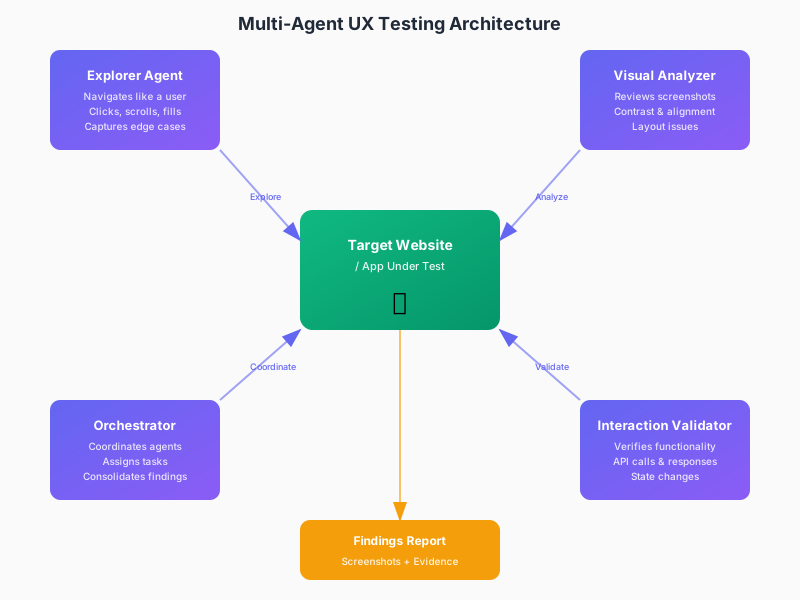
A multi-agent UX testing system is what a real QA team looks like when you remove the human boredom.
Instead of one tool (or one person) looking at your app, you have multiple specialized agents working in parallel:
The Explorer Agent does what bored QA testers do, but without getting tired. It navigates your app like a user would—clicking buttons, filling forms, scrolling long pages, hitting edge cases. But it doesn't get distracted. It doesn't skip the boring flows. It captures screenshots of every interaction. It tests the same login flow 50 times in different ways, looking for the one that breaks. It's relentless in the way only code can be.
The Visual Analyzer looks at those screenshots with fresh eyes. It's looking for what a designer would catch: color contrast that fails accessibility standards, buttons that don't align, text that overflows and becomes unreadable. It compares each screenshot to the previous one—if you changed something, the analyzer sees it. Not just sees it: it flags it with evidence.
The Interaction Validator watches whether the app behaves correctly. Did the form actually submit? Did the API request actually happen? Is the data that came back what we expected? This agent cares about the invisible stuff—the console errors, the network calls, the state changes.
The Orchestrator coordinates between all of them. When the visual analyzer finds something wrong, it can tell the explorer agent "go reproduce this issue." When the validator finds a data problem, it tells the explorer "were you able to see this in the UI?" They work together, confirming findings and building a complete picture.
What makes this different from a single tool: these agents see different layers of the same problem. When something is broken, you don't get a mystery score. You get screenshots showing what went wrong, a step-by-step path to reproduce it, and confirmation that the issue is real and consistent.
Time to complete a standard regression suite: homepage, signup, checkout, 2 forms, mobile nav, footer links. Multi-agent systems reduce setup complexity because they explore rather than requiring scripted paths.
This is what "screenshot-based testing" actually means. Not: "we took a screenshot." But: "we have visual evidence of every issue we found, reproducible with exact steps."
Why Screenshot Evidence Matters More Than You Think
Here's a frustration developers have that nobody talks about: when you run Lighthouse, you get a score. When you run your test suite, you get a pass or fail. When you manually test and find something, you get... your word for it. You have to describe it to someone else, hope they understand, hope they believe you.
Screenshots change this. They're undeniable.
If an automated system finds a low-contrast form field, it doesn't tell you "contrast ratio is 3.5:1, needs to be 4.5:1." It shows you the field, highlighting the exact pixels that fail, and explaining why a user with partial color blindness would struggle to see it. If the navigation is broken on mobile, the system doesn't tell you "mobile layout broken." It shows you exactly which viewport width breaks it, what it looks like before the break, what it looks like after, and provides the exact steps to reproduce it.
The screenshot is proof. The evidence is visual. No argument about whether it's a real problem—you're looking at it.
This also changes how your team responds to bugs. When a designer sees a screenshot of their button overflowing on a tablet, they understand immediately. When a product manager sees a form field with unmovable text, they understand why users abandon it. When you come back to a bug report three months later, you don't wonder "was this actually an issue?" You see it.
For a solo developer or indie hacker, this is everything. You don't have time to write bug reports. You certainly don't have time to defend a bug to someone who didn't see it. But you have time to glance at a screenshot.
Finding Issues Is Good; Fixing Them Is Better
There's a category of QA problems that are almost not worth catching: the low-hanging fruit bugs that you could fix instantly if you just knew about them.
- A button that's slightly misaligned, looks sloppy
- Text color that's too light on certain backgrounds
- Form validation that's missing on one field
- A mobile layout where an image doesn't fit
- Inconsistent spacing between sections
A system that only identifies problems leaves you with a list. A system that can propose fixes—or even apply them automatically—saves you the worst kind of time waste: fixing an issue you already understood the moment you saw it.
This is where multi-agent systems start to get interesting. Once the analyzer identifies a contrast issue, you don't need a human developer to think about how to fix it. The fix is usually obvious: "increase the color's lightness value by 15." Once the explorer identifies a button that doesn't work on Safari, the logs tell you exactly what browser event is missing. Once the validator confirms a form field isn't validating, the code change is mechanical.
Some of the best QA tools in development teams now include a "suggested fix" for issues they find. Not AI hallucinating solutions—literal, mechanical fixes that address the identified problem. Click one button, the fix is applied, your test suite re-runs, you confirm it worked.
For developers who hate QA because it's tedious and repetitive, this is the difference between hours and minutes.
What Actually Gets Found (And Why You Miss It)
Let's be concrete. Here are real bugs that automated systems find that developers, unit tests, and Lighthouse miss:
Low-contrast text in user-generated content. Your CSS looks fine. Your tests pass. But when a user enters certain text in your form—all caps, specific font weight—the contrast drops below accessible standards. Lighthouse doesn't test this because it only looks at static page content. Your unit tests don't care about colors. A manual QA person might miss it because they're testing with standard form inputs, not edge cases. A multi-agent system that feeds random text variations into the form and screenshots the result will find it.
Navigation breaks on tablet-sized viewports. Your media queries work. Your mobile view works. Your desktop view works. But at 768px width—the exact size of a certain iPad—the nav menu collapses wrong and overlays your content. You'd only catch this if you explicitly tested that viewport. Most developers test "mobile" and "desktop." The agent tests every viewport width, finding the edge cases.
Buttons become unclickable after certain user actions. Your form submission works. Your button click works. But if a user submits once, then tries to submit again while the first request is still pending, the button becomes disabled and never re-enables. Your happy-path tests miss this. Your unit tests don't simulate timing. A QA person might hit submit once and think it's working. An agent that submits 100 times, with random delays, finds the timing bug.
Images don't load in certain browsers. Your image paths are relative. They work fine in local testing. They work in Chrome and Firefox. But Safari caches aggressively and serves a stale version. Or Edge handles relative paths differently. Single-browser testing misses this. Running the same user flow in 8 different browsers reveals it.
Error messages are cut off on mobile. Your error message container is defined in pixels. On desktop, it's fine. On mobile, the viewport width forces text to wrap three times, and the last line overflows the container, becoming unreadable. Your Lighthouse report doesn't check this. Your mobile tests use standard devices. A system that checks text metrics on every possible viewport width finds it.
These are all real bugs. They all affect user experience. They all get to production with current testing approaches. They all take 30 seconds to fix once you know about them.
Why This Is Suddenly Possible
Multi-agent UX testing isn't new in theory. Real QA teams have done this for decades. What's new is that it's now possible to automate a real QA team's worth of specialized thinking without hiring one.
LLMs changed this. Not because they're "intelligent," but because they're good at:
- Recognizing patterns in images. "This text is too light to read" doesn't require human judgment anymore. Computer vision can evaluate contrast, size, legibility.
- Coordinating multiple perspectives. Instead of one tool returning one score, you can have multiple agents evaluating the same screen and combining their findings. The orchestrator agent just has to decide what matters.
- Simulating exploration. Instead of writing scripts that test happy paths, you can write instructions like "try to submit this form in 20 different ways." The agent explores.
- Explaining findings. The agent doesn't just fail a test—it explains why, with reference to the screenshot evidence.
This isn't science fiction. This is what's happening right now in tools that are less than 2 years old.
For Indie Hackers and Solo Developers
You're the one reading this thread on r/webdev at 10pm, angry because you just spent three hours testing before launch and you're still not confident you caught everything.
Multi-agent UX testing is for you, specifically.
It won't replace your thinking. You still need to decide what matters. But it will replace the tedious part—the repetition, the clicking, the endless scrolling through different browsers, the squinting at buttons to check alignment.
Deploy your site to staging. Run an automated UX audit. Get back a report with screenshots showing every issue, grouped by severity, with explanatory evidence for each one. Spend 15 minutes reviewing—does this look right? Did it catch the real issues? Then either apply suggested fixes automatically, or spend the next hour fixing the couple of things that matter.
That's a process you can actually do before every launch. That's something that catches 90% of the issues instead of 70%. That's testing that doesn't feel like punishment.
FAQ: automated website testing for tired QA teams
Is automated website testing the same as website usability testing?
No. Automated website testing is best for repeatable coverage across flows, viewports, and releases. Website usability testing is better when you need to understand why users hesitate, mistrust a page, or misread the offer.
Why does screenshot-based testing matter more than a pass/fail report?
Because screenshots make the issue legible to everyone involved. A designer, PM, and engineer can all see the same broken state immediately instead of debating whether a bug report is describing a real problem.
When should a lean team automate QA first?
Automate first when the team ships often, cannot manually regression-test every path, and keeps finding the same kinds of bugs after launch. That is the moment where recurring pre-launch coverage creates leverage.
What should an automated website testing tool actually return?
It should return screenshot evidence, reproduction steps, affected viewport or browser context, severity, and a fix path clear enough for someone to act on quickly. If it only returns a score, it is not helping enough.
Sources and further reading
- Baymard Institute: Checkout usability research
- Playwright: Browser automation for modern web apps
- BrowserStack guide to cross-browser testing
If you want the broader operational playbook, read our guides to automated website testing, website usability testing: manual vs AI-powered, AI website analyzer, form UX testing, and pre-launch UX checklists.
Related Reading
For teams evaluating testing strategies:
- Best Automated Website Testing Tools (2026): 8 Platforms Compared — Head-to-head comparison of coverage, speed, and pricing across leading platforms
- Best UX Testing Tools for Conversion-Focused Teams (2026) — Our evaluation of 10 platforms with ROI breakdowns for different team sizes
For solo developers and indie hackers:
- Form UX Testing: 12 Form Abandonment Fixes That Actually Work — Specific patterns that reduce form abandonment by 15-40%
- Pre-Launch UX Checklist: 47 Items That Stop Silent Conversion Killers — The checklist format we wish existed when we started building
For understanding the shift from manual to automated testing:
- Automated Website Testing Guide: What It Actually Catches — Detailed breakdown of what automation finds that humans miss
- Website Usability Testing: Manual vs. AI-Powered Approaches — When to use each approach and how to combine them effectively
A Thought Worth Keeping
Testing will never disappear. But the work of testing might.
Right now, we accept that QA is boring, incomplete, and necessary. We treat it like taxes or dentist appointments—unpleasant things you do because you have to, hoping you do it well enough to avoid disaster.
What if, instead, we treat it like we treated image optimization in the 2010s? We used to hand-optimize every image, check file sizes, and verify they loaded. Then tools got better, and we stopped thinking about it. The optimization still happens. It's just automatic.
Testing isn't there yet. But it's closer than you think. The future of QA isn't "more developers doing manual testing." It's "specialized agents doing the tedious testing work while developers focus on the actual decisions: what should we test, and what tradeoffs are worth making."
That future actually sounds kind of nice.
UX Tester is a multi-agent UX testing tool that finds what other tools miss. Drop your localhost URL or Electron app, get a severity-scored report with screenshot evidence in minutes. Auto-fix available for the issues you'd rather not hand-code.
Related Articles
UX Testing Tool: How to Choose the Right One in 2026
A UX testing tool should help you catch usability issues before launch. Here is how to compare manual, behavior, and AI-first options in 2026.
Website Usability Testing: Manual vs AI-Powered
Website usability testing works best when manual research and AI-powered testing cover different kinds of friction before users bounce.
AI Website Analyzer: What It Finds That Your Team Misses
An AI website analyzer finds UX friction, mobile issues, and conversion blockers that traditional QA misses before they cost you users.
Ready to test your UX?
Websonic runs automated UX audits and finds usability issues before your users do.
Try Websonic free