Website Feedback Tool: What to Look For Before You Buy
A website feedback tool should capture why users hesitate, not just where they click. Here’s how to choose one that improves UX and conversion.
Websonic Team
Websonic
A website feedback tool should do more than collect comments in a sidebar. The right website feedback tool helps you understand why users hesitate, what they expected to happen, and which friction points are quietly hurting conversion.
That matters because analytics only tell you what happened. They do not tell you why. Baymard’s 2025 checkout benchmark found that 64% of desktop ecommerce sites and 63% of mobile sites still have a mediocre or worse checkout experience, while 62% of sites fail to make guest checkout the most prominent option even though 19% of shoppers say they abandoned an order because they did not want to create an account. Those are exactly the kinds of problems teams often miss internally until revenue starts leaking.
A strong website feedback tool closes that gap. It helps teams hear directly from users in the moment, not weeks later in a retrospective when the original confusion is harder to reconstruct.
Jump to: what it should help you learn · features that matter most · which category fits · how to choose · FAQ
Quick verdict: if your team only needs a lightweight way to ask why users bounced, a simple targeted survey tool can work. If you need reproducible bugs, choose a visual feedback tool. If you need to connect comments to real behavior and conversion friction, pick a behavior-plus-feedback tool — that is the category most growth and UX teams actually outgrow into.
If you only have 2 minutes: buy by failure mode
| If the failure looks like... | Start with this website feedback tool category | Why it is the best first fit |
|---|---|---|
| "We know people drop, but we do not know what felt unclear" | Survey-first or page-targeted feedback | Fastest way to collect direct objections in the moment |
| "Users and clients keep reporting visual issues we cannot reproduce" | Visual feedback tool | Screenshots and annotations turn vague complaints into fixable evidence |
| "Analytics shows exit, but we need to connect comments to real behavior" | Behavior-plus-feedback tool | Best for tying hesitation to page context, replay, and conversion friction |
| "Multiple teams need dashboards, routing, and recurring themes" | Voice-of-customer platform | Better fit when feedback must become a cross-team operating system |
Fast buyer scan: choose the website feedback tool based on the kind of failure you need to explain, not the vendor with the longest feature list.
| If your team looks like... | Start with this website feedback tool category | Why it is the better fit |
|---|---|---|
| Solo founder or very small SaaS team | Survey-first or page-targeted feedback | Gives you direct objections fast without adding a heavy workflow to maintain |
| Agency, QA lead, or client-services team | Visual feedback tool | Screenshots and annotations make issue handoff faster and reduce back-and-forth |
| Growth, product, or CRO team working on funnels | Behavior-plus-feedback tool | Best fit when you need to connect user comments to hesitation, replay, and conversion context |
| Larger multi-team org with research or support ops | Voice-of-customer platform | Better when feedback needs tagging, routing, reporting, and recurring theme analysis across teams |
The buying case for a website feedback tool: recurring conversion friction is common, but deep manual testing still takes focused effort.
What a website feedback tool is actually for
A website feedback tool is any system that helps you collect direct qualitative input from visitors while they are using your site or immediately after a task.
That can include:
- on-page feedback widgets
- short surveys on key pages
- exit-intent questions
- bug-report tools with screenshots
- post-task prompts after signup, checkout, or form completion
- tools that pair feedback with session context or behavioral data
The important distinction is this:
- analytics tools show where people click, drop off, or bounce
- a website feedback tool helps explain why they felt stuck, uncertain, or unconvinced
Contentsquare’s guide to website feedback tools makes this point well: analytics answer the who, what, when, and where, but feedback answers the why. That is the missing layer most teams need.
Why teams buy the wrong website feedback tool
Many teams evaluate feedback tools like they are buying a survey plugin.
They compare pricing, templates, and integrations, then pick whichever tool seems easiest to install. That often leads to a low-value setup: a generic “How was your experience?” widget collecting vague comments nobody acts on.
The better question is not “Which widget has the most features?”
It is: what kind of friction are we trying to uncover?
Because different tools solve different problems.
If you need to understand conversion drop-off
You need targeted questions on:
- pricing pages
- signup flows
- checkout steps
- demo request forms
- high-exit pages
A general-purpose survey tool may be enough if it can trigger based on behavior and keep questions short.
If you need bug reports from users or clients
You need visual annotation, screenshots, metadata, and a fast way to route issues into Jira or another workflow.
This is less about customer sentiment and more about reproducibility. If your team is still doing this work with ad hoc screenshots and Slack threads, our post on why so many teams hate QA testing breaks down where that process starts to fail.
If you need to understand usability friction
You need a website feedback tool that works with behavior context: session replay, page targeting, task-based prompts, or page-specific questions that reveal hesitation and confusion in real time.
That is where simple pop-up forms usually fall short. When the friction shows up inside a form or checkout step, our guide to form UX testing and abandonment fixes shows the kinds of issues direct feedback should help you isolate faster.
What a good website feedback tool should help you learn
A strong website feedback tool should help you answer questions like:
- What stopped this user from completing their task?
- Which page element created confusion?
- Did the visitor find the information they expected?
- Did the page feel trustworthy at the decision point?
- Was the form or flow harder than users expected?
- Is this a one-off complaint or a recurring pattern?
Those questions matter because many UX failures are subtle.
A page may technically work and still fail the human test.
The call to action is visible, but not convincing. The form is functional, but feels too long. The pricing page is accurate, but leaves users unsure which plan applies to them. The checkout path works, but one missing explanation introduces just enough doubt to kill momentum.
That is why direct feedback matters. Nielsen Norman Group’s usability guidance is still the right anchor here: the point of usability work is to uncover problems and opportunities by observing or hearing from real users, not by assuming the design is self-explanatory. And when the issue sits inside a conversion path rather than a survey response, our breakdown of The $50K Button shows the kind of simple CTA and form fixes that create outsized wins.
The best website feedback tool captures context, not just comments
This is the most important buying criterion.
A comment without context is often useless.
If someone writes “This page is confusing,” you still need to know:
- which page they were on
- what device they used
- whether they were new or returning
- which part of the page triggered the reaction
- what they were trying to accomplish
- whether other users showed the same pattern
That is why the best website feedback tool usually includes some combination of:
- page-level targeting
- screenshots or visual annotations
- session context or replay
- device/browser metadata
- event-based triggers
- tagging or categorization for recurring themes
If you already know where users seem to hesitate but need a faster pattern library for what those click and scroll signals usually mean, our guide to website usability testing with heatmaps is the practical companion. Feedback tells you what users say. Heatmaps help you see where the friction clusters.
Without that context, teams end up reading feedback like customer-service inbox noise instead of product evidence. If you want the complementary pre-launch layer before users ever leave that comment, read our guide to AI website analyzers. A feedback tool captures the reaction; an AI website analyzer helps catch the likely friction earlier.
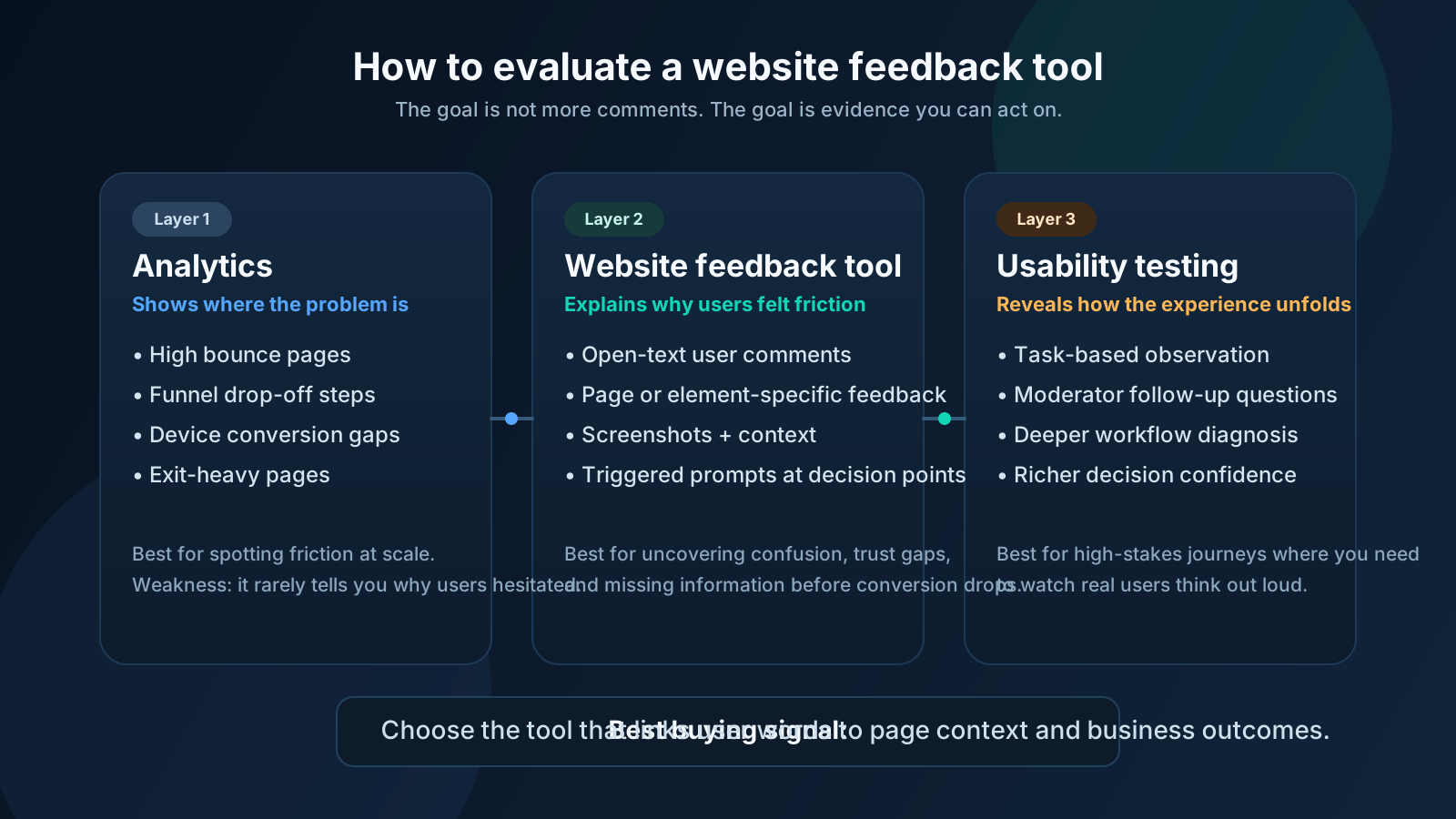
Website feedback tool vs analytics vs usability testing
These are not substitutes. They solve different layers of the same problem.
Analytics tells you where the problem is
Analytics can show:
- which pages have high bounce
- where form completion drops
- where users exit a funnel
- which devices convert poorly
That is useful, but incomplete.
A website feedback tool tells you why users felt friction
Feedback reveals:
- missing information
- unclear labels
- trust issues
- hesitation at key steps
- emotional resistance to forms or pricing
- confusion that does not show up in event logs
Usability testing tells you how the experience unfolds in full
Usability testing gives the deepest view because you can watch people try to complete tasks and explain their thinking. Nielsen Norman Group recommends five participants for a typical qualitative usability study to uncover the majority of common issues.
But that depth comes with a cost in time, recruiting, and analysis.
That is why a website feedback tool is useful: it gives teams a lighter, always-on way to collect directional evidence between full research rounds. If you need to diagnose where people stall before you design the follow-up study, our breakdown of why users leave in session recordings is a practical companion.
If you want the shortest version:
- use analytics to spot the problem
- use a website feedback tool to hear the reason in users’ words
- use usability testing to go deeper when the stakes are high
The 6 features that matter most in a website feedback tool
If you are comparing options, prioritize these six features.
1. Behavioral targeting
The tool should let you trigger feedback based on where users are and what they just did.
Examples:
- on exit from a high-intent page
- after a failed form submission
- after a completed purchase or signup
- after someone spends unusually long on a page
- on high-dropoff steps in a funnel
Generic sitewide prompts usually produce generic answers.
2. Open-text responses, not just ratings
A one-click rating is useful for trend tracking. It is not enough for diagnosis.
You need open text somewhere in the flow, even if it is optional. Otherwise you get a score without a reason.
3. Page or element-level specificity
The best feedback is attached to something concrete.
A screenshot, highlighted region, or page-specific prompt is much more actionable than a general complaint about “the website.”
4. Contextual metadata
Browser, device, URL, timestamp, and user segment data save enormous debugging time.
This matters especially when the issue only affects mobile, logged-out users, or a particular traffic source.
5. Routing and prioritization
A website feedback tool becomes much more valuable when it can push issues into the places teams already work: Jira, Slack, Linear, Notion, or support workflows.
The goal is not to collect more feedback. The goal is to convert feedback into fixes.
6. Pattern detection
One frustrated comment is a signal. Twenty similar comments are a roadmap.
The tool should make it easy to tag, group, or summarize repeated themes so teams can prioritize by frequency and business impact.
What different categories of website feedback tools are good at
Most tools fall into one of four buckets.
Most teams buying a website feedback tool for UX and conversion work do not need the heaviest platform — they need enough context to turn comments into fixes.
1. Survey-first tools
Best for:
- NPS, CSAT, CES
- post-task satisfaction
- asking specific questions on key pages
Weakness: They often miss behavioral and visual context.
2. Visual feedback and bug-report tools
Best for:
- design QA
- client review
- annotated screenshots
- issue reporting during staging or live review
Weakness: They are often stronger for debugging than for understanding conversion psychology.
3. Behavior-plus-feedback tools
Best for:
- pairing direct comments with session replay or page behavior
- identifying friction in forms, funnels, and landing pages
- combining qualitative and behavioral evidence
Weakness: They can be more expensive or broader than small teams initially expect.
4. Full voice-of-customer platforms
Best for:
- larger teams that need segmentation, dashboards, workflows, and multi-channel feedback
- organizations running feedback as a continuous program
Weakness: They can become heavy if your actual need is just page-level UX insight.
How to choose the right website feedback tool for your team
Choose based on the decision you need to make.
Pick a simple website feedback tool if:
- you need a lightweight way to ask users what stopped them
- you are testing one funnel or a few key pages
- you want directional insight fast
Pick a visual feedback tool if:
- designers, QA, or clients need to mark problems directly on the page
- reproducing issues quickly matters more than survey depth
Pick a behavior-plus-feedback tool if:
- your site has meaningful traffic
- you already know pages are underperforming
- you need to connect user comments to what people actually did
- you need a bridge between passive analytics and full website usability testing
Pick a broader platform if:
- multiple teams need shared reporting
- you are managing NPS or CX programs alongside website UX
- feedback must route into formal workflows across product, support, and marketing
The mistake to avoid after installation
The biggest failure is not choosing the wrong tool.
It is asking bad questions.
Do not ask vague prompts like:
- “Any feedback for us?”
- “How was your experience?”
Ask questions tied to a real task or decision point instead:
- “What stopped you from completing your purchase today?”
- “Was anything missing from this page?”
- “Did you find the information you expected here?”
- “What made you hesitate before signing up?”
Short, specific, contextual questions produce better answers.
That is what turns a website feedback tool from a passive suggestion box into an actual UX instrument.
A website feedback tool is not the strategy
The tool matters. The operating model matters more.
Use feedback on the pages where business outcomes depend on clarity and trust:
- pricing
- signup
- demo requests
- checkout
- support flows
- high-traffic landing pages
Then pair what users say with what they do.
If multiple users say a page feels unclear and analytics show high exit, you have a strong case for change. If feedback says the form is too long and session replays show hesitation halfway through, that is not opinion anymore. It is evidence.
That is the real value of a website feedback tool.
Not that it collects more comments. Not that it looks modern in your stack. But that it helps teams stop guessing.
If you want broader UX coverage before users complain, pair a website feedback tool with automated website testing. If accessibility complaints or procurement questions are part of the same release risk, add our website accessibility testing guide for small teams so keyboard, contrast, and screen-reader gaps do not stay invisible until after launch. If you are deciding between direct feedback and hands-on research, read our guide to website usability testing: manual vs AI. If you are comparing platforms at the category level, our roundup of the best UX testing tools in 2026 maps where feedback tools fit relative to session replay, unmoderated research, and AI audits. And if your team is preparing a release, use this alongside our pre-launch UX checklist.
Website feedback tool FAQ
What is the best website feedback tool for conversion optimization?
The best website feedback tool for conversion optimization is usually one that pairs page-level feedback with behavioral context. A lightweight survey widget can tell you what users disliked, but a behavior-plus-feedback tool is more useful when you need to tie comments to specific hesitation points, form abandonments, or session patterns.
Is a website feedback tool the same as website usability testing?
No. A website feedback tool collects lightweight, always-on qualitative input from real visitors on live pages. Website usability testing is a deeper research method where you watch users complete tasks and explain their thinking. Feedback tools help you spot recurring friction; usability testing helps you understand the full experience in detail.
Can a website feedback tool replace analytics?
No. Analytics show where users drop off, bounce, or convert. A website feedback tool explains why those behaviors may be happening by capturing user objections, confusion, or missing information in their own words. The two work best together.
When should a small team buy a website feedback tool?
A small team should buy a website feedback tool when a handful of pages carry outsized business weight and the team keeps arguing about why they underperform. Pricing pages, signup flows, demo request forms, and checkout steps are usually the highest-use starting points.
Sources
- Baymard Institute, Checkout UX Best Practices 2025
- Nielsen Norman Group, Usability (User) Testing 101
- Contentsquare, The Best Website Feedback Tools and How to Use Them
Websonic helps teams find UX friction before it shows up in drop-off, complaints, or lost conversions. It combines automated website testing with evidence you can act on.
Related Articles
UX Testing Tool: How to Choose the Right One in 2026
A UX testing tool should help you catch usability issues before launch. Here is how to compare manual, behavior, and AI-first options in 2026.
Website Usability Testing: Manual vs AI
Website usability testing works best when manual research and AI testing cover different kinds of friction before users bounce.
AI Website Analyzer: What It Finds That Your Team Misses
An AI website analyzer finds UX friction, mobile issues, and conversion blockers that traditional QA misses before they cost you users.
Ready to test your UX?
Websonic runs automated UX audits and finds usability issues before your users do.
Try Websonic free